
What's new in Console update 1.64.6.x#
- Highlight cards on the students end
- Run quick polls.
Highlight cards on the students end#
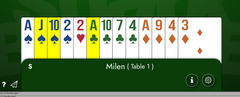
On the teacher's table you can press and hold the "H" key and click on a card, the card will be highlighted on the students end, the card is also always turned face up. To clear the highlight of a card, you can hold the "H" key and left click on the card, or you can hold the "R" key and click on any card to remove all highlights. When you load/reload a hand all highlights are removed.
Polling#

This was requested by the BridgeWhiz program. It is a useful tool to ask quick questions and get more participation from your students, especially in large groups when everyone is muted. Click Here for instructions on how to run and save canned polls.
